Overview
For most manufacturing companies, the product catalogue is the commercial heart of the website. It is where a technical buyer validates that you can supply what they need to the specification they require. It is where a procurement manager verifies your product range against their sourcing criteria. It is where a new prospect decides whether you are worth a conversation.
Getting the product catalogue right is not primarily a design problem. It is an information architecture problem. The visual design matters, but the decisions that determine whether the catalogue serves your buyers, whether its structure allows them to find what they need, whether its search and filtering works for technical queries, and whether its documentation is accessible and current, are architectural decisions made long before any design work begins.
In this article:
- Why the product catalogue is the most important part of a manufacturing website
- Structure: how to organise a large product catalogue
- Product page design
- Search and specification filtering
- Technical documentation management
- Platform choice for product catalogues
- Info-Gel: a product catalogue case study
- Frequently asked questions
This article is part of the complete guide to manufacturing website design.
Find out more about our manufacturing web design service.
1. Why the product catalogue is the most important part of a manufacturing website
A buyer who arrives on a manufacturing website with a specific product requirement is on a mission. They are not browsing; they are specifying. They need to know: do you make what I need, in the grade or variant I require, to the standard that applies to my application? If your catalogue does not answer this question efficiently, they will find a competitor's catalogue that does.
The commercial stakes of product catalogue design are high and asymmetric. A buyer who finds what they need and can immediately access the specification and documentation they need to verify it is very likely to make contact. A buyer who cannot find their product, cannot locate the data sheet, or cannot compare variants will leave and probably not return.
| The 24-hour sales resource |
| A well-designed manufacturing product catalogue is a sales resource that operates around the clock, in every time zone, without requiring your commercial team to be available. Every improvement to the catalogue's findability, its specification depth, and its documentation accessibility directly improves the quality and volume of inbound enquiries. |
2. Structure: how to organise a large product catalogue
The fundamental structural decision in a manufacturing product catalogue is how to organise and navigate the products. Most manufacturers have an existing internal structure (by product family, by raw material, by production process) that reflects how the engineering and production teams think about the range. This is rarely the right structure for a buyer-facing digital catalogue.
Product hierarchy vs application hierarchy
Buyers approach product catalogues from two directions. Buyers who know what they want navigate by product: they need activated carbon, grade X, for pharmaceutical purification. They need a product family navigation. Buyers who are starting from a problem navigate by application: they need to purify a chemical stream, or remove a specific contaminant from water, and they need to understand which of your products addresses that problem.
A well-structured manufacturing catalogue offers both entry points. A primary navigation by product family for buyers who know what they need, and an application or industry entry point for buyers who are starting from a challenge. The underlying product pages are the same; the pathways to reach them differ.
Taxonomy design: categories and attributes
Taxonomy is the classification system that organises your products. Categories are broad groupings (activated carbon, specialty gels, automotive components). Attributes are the properties that describe individual products within a category (material, grade, temperature range, pressure rating, application). Well-designed taxonomy allows buyers to filter by attribute, compare products within a category, and understand relationships between products without navigating page by page.
The taxonomy design decision happens during the discovery and strategy phase of the project, before any development begins. A taxonomy designed around internal product codes rather than buyer search behaviour produces a catalogue that your team understands and your buyers find difficult. A taxonomy designed around the attributes buyers actually search for and filter by produces a catalogue that converts.
URL and SEO structure
The URL structure of a product catalogue has significant SEO implications. A product accessible at /products/specialty-gels/cable-filling-gel ranks for different and more specific queries than one accessible at /products/item-12847. URL structure should reflect the product hierarchy clearly, include relevant keywords, and remain stable over time. Product URLs that change when the internal catalogue system is updated cause SEO damage that is slow to recover from.
3. Product page design
Individual product pages are the commercial decision points of the catalogue. A buyer who reaches a product page relevant to their requirement is evaluating whether to make contact. The design of the product page either supports or undermines that decision.
Page structure: application first, specification second
Lead with the application context: what this product is used for, in what environments, and for what industries or challenges. Follow with the specification table. This structure serves both buyer types: the technical buyer who is confirming their specification skims the application context and goes straight to the table; the discovery buyer who is starting from a problem reads the application context and uses it to confirm relevance before going into specification detail.
Specification table design
Specification tables should be consistently formatted across all products in a category, clearly labelled with units, and structured to allow comparison between products where variants exist. Key performance parameters should appear first. Secondary parameters (dimensions, packaging, storage requirements) can follow. Tables that require horizontal scrolling on desktop, or that collapse into an unreadable format on mobile, lose technical buyers who are comparing specifications.
Variant and grade presentation
For products that come in multiple grades or variants, the page needs a clear mechanism for presenting the differences. Options include: a table that lists all variants with their distinguishing specifications; a tabbed interface that shows each variant's specification separately; or a filterable selector that updates the displayed specification based on the variant selected. The right approach depends on the number of variants and the complexity of the differentiating specifications. What is always wrong is a single product page that lists all variants in a wall of text without structured comparison.
Related products and applications
Every product page should surface related products (other grades in the same family, complementary products used in the same application) and related application or industry pages. This cross-referencing keeps buyers on the site as they refine their specification and surfaces products they might not have found through the primary navigation.
4. Search and specification filtering
For manufacturing buyers, the ability to search by specification rather than by product name is frequently the most valuable functionality on the website. A buyer who needs a material with a specific temperature resistance, a specific particle size, or a specific certifications standard wants to filter to the relevant products without reading through an entire catalogue.
Full-text search
Full-text search across product names, descriptions, specifications, and technical documentation allows buyers to find relevant products by the terms they actually use. The search must be capable of returning results for specification terms, material names, application keywords, and certification standards, not just product names. A search that only returns product name matches misses the majority of specification-led queries.
Attribute filtering
Faceted attribute filtering, where buyers can filter products by multiple specification attributes simultaneously (material type AND temperature range AND certification standard), is the most powerful tool for technical buyers navigating a large catalogue. Building this functionality requires a properly structured product data model where each attribute is stored as a structured field rather than embedded in product description text.
The attributes available for filtering should be determined by buyer research: what specifications do your buyers most frequently ask about? What are the criteria they use to shortlist products? These are the filter attributes that deliver commercial value. Filtering by internal product codes or manufacturing batch numbers does not help buyers; filtering by application temperature range, chemical compatibility, or particle size does.
Technical documentation search
Where a manufacturer has a large technical documentation library (data sheets, safety data sheets, application notes, compliance certificates), a separate search within the documentation library allows buyers to find the specific document they need without navigating the full product catalogue. This is particularly valuable for buyers who already know your product and need a specific document quickly.
Info-Gel's product catalogue implementation, described in the case study below, demonstrates how effective search and documentation access transforms a complex catalogue into a usable technical resource. Read more in our manufacturing website examples guide.
5. Technical documentation management
Technical documentation, the data sheets, safety data sheets, application guides, and compliance certificates that buyers need to verify and specify products, is one of the most commercially significant elements of a manufacturing website. It is also one of the most commonly neglected.
Documentation architecture
Documentation should be accessible from the relevant product page in one click, downloadable without requiring a form submission, clearly dated, and kept current. Outdated documentation on a manufacturing website is a credibility and compliance risk. A product page that requires a buyer to contact the company to request a data sheet creates friction that costs enquiries.
CMS management of documentation
The CMS architecture for a manufacturing website should allow non-technical team members to update product documentation without developer involvement. When a revised data sheet is issued, the person responsible for regulatory documentation should be able to upload the new version and attach it to the relevant product pages without raising a ticket. This requires a properly designed CMS with a documentation management workflow built into the product data model.
Format and accessibility
Technical data sheets should be provided as PDFs in a format that is both human-readable and, where possible, machine-readable for buyers who use procurement software. Safety data sheets should comply with the relevant regulatory format (GHS in most markets). Where multiple language versions are required, the CMS should support attaching language-specific documents to each product.
6. Platform choice for product catalogues
The platform choice for a manufacturing product catalogue website is significantly influenced by the complexity of the product data model and the required catalogue functionality.
WordPress with ACF PRO
For complex catalogues with many custom product attributes, sophisticated specification filtering, or integration with external product databases, WordPress with custom post types and Advanced Custom Fields Pro is the most flexible option. It can accommodate any data model, any search and filtering requirement, and integration with ERP or PIM systems. The trade-off is development complexity and ongoing maintenance.
HubSpot CMS
For manufacturers already using HubSpot CRM, HubSpot CMS provides native integration between the product catalogue and the commercial pipeline. Every catalogue interaction by a known contact is recorded against their CRM record, giving the sales team visibility into which products a prospect has been evaluating before the first conversation. HubSpot CMS handles moderate catalogue complexity well.
Webflow
Webflow's CMS handles standard catalogue requirements well for moderate product ranges (up to 10,000 CMS items). For very large catalogues or complex specification filtering, the platform's CMS item limits and filtering capabilities may become constraints. Webflow is most appropriate for design-led manufacturers with moderate catalogue complexity.
For a full platform comparison, read our guides to WordPress for B2B, HubSpot CMS for B2B, and Webflow for B2B.
7. Info-Gel: a product catalogue case study
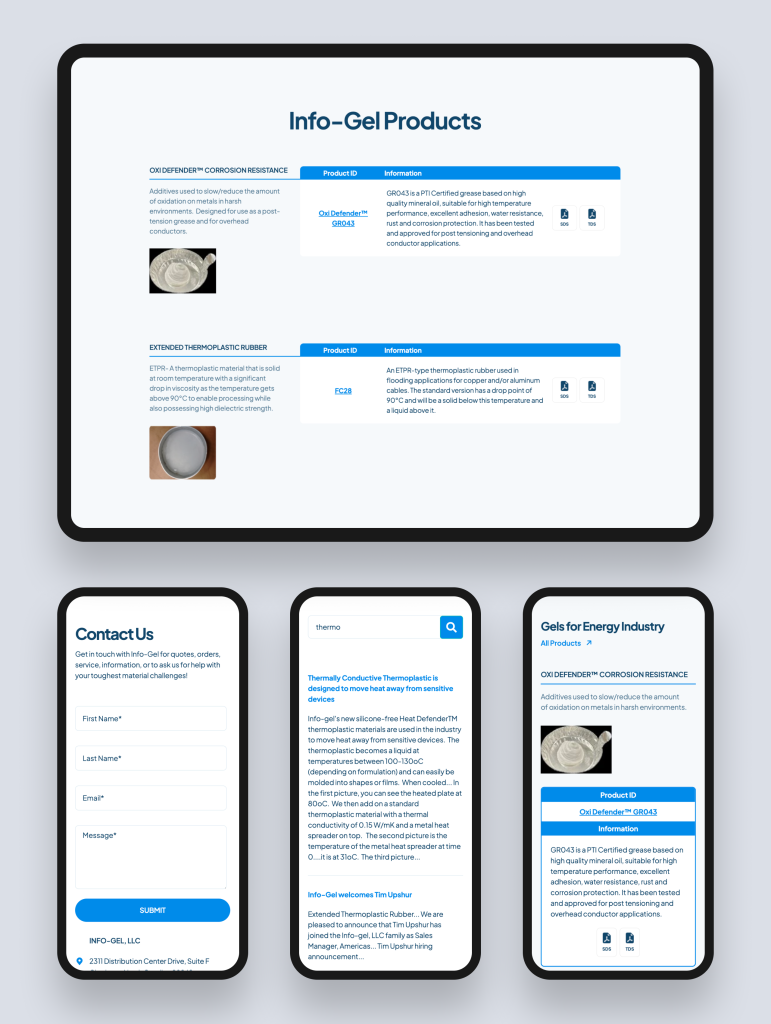
Info-Gel manufactures specialty gels for cables, with an extensive product catalogue covering a wide range of specialty formulations for different cable types, operating environments, and performance requirements. Each product has specific technical data sheets and safety data sheets that cable manufacturers and specifiers need to access as part of their qualification process.
Their existing website had no cohesive structure for navigating the catalogue, and no search functionality for finding the specific product data sheets that buyers needed. The result was a technically capable company whose digital presence made it harder, not easier, for buyers to specify their products.
Rudo designed and built a new catalogue-type website using HubSpot CMS, with a well-organised product taxonomy, intuitive navigation through the product families, and robust search functionality making both products and their technical documentation (TDS and SDS) efficiently accessible. The redesigned website received positive feedback from both existing clients and potential customers, with Info-Gel establishing a digital presence that matches the technical quality of the products it represents.
Read the full case study: Info-Gel case study.
8. Frequently asked questions
How should a manufacturing product catalogue be structured?
A manufacturing product catalogue should offer two navigation paths: a product hierarchy for buyers who know what they want, and an application or industry path for buyers starting from a problem. Individual product pages should lead with application context before specifications. Variant and grade comparison should be structured and visual, not presented as undifferentiated text. Technical documentation should be accessible from product pages in one click.
What is specification filtering on a product catalogue website?
Specification filtering allows buyers to filter products by their technical attributes, such as temperature range, material compatibility, particle size, or certification standard, to find products that meet their specific requirements without reading through an entire catalogue. It requires a structured product data model where each attribute is stored as a distinct field rather than embedded in product description text. It is one of the highest-value features for technical buyers on a complex manufacturing catalogue.
Should technical data sheets be behind a form gate?
For most manufacturing buyers, requiring form submission to access a technical data sheet creates friction that reduces enquiries. A buyer who needs a data sheet to complete a specification exercise and cannot access it immediately will find an alternative supplier. Making data sheets freely downloadable from product pages reduces support burden, builds buyer confidence, and is an SEO asset. Gating data sheets is appropriate only where the documentation contains genuinely sensitive information.
How many products can a manufacturing website CMS handle?
WordPress with a custom theme and proper database architecture has no practical product limit. HubSpot CMS and Webflow have CMS item limits (10,000 on Business plans for both) that are sufficient for most mid-market manufacturers. Very large catalogues with tens of thousands of products may require integration with a dedicated Product Information Management (PIM) system rather than native CMS management.
Ready to talk about your manufacturing website?
Rudo builds manufacturing product catalogue websites that serve technical buyers efficiently and convert interest into enquiries. Book an intro call to discuss your catalogue requirements.
Find out more about our manufacturing web design service.
Also in this series: manufacturing website design guide, manufacturing website cost, manufacturing website examples, and SEO for manufacturers.

Written by
Rudo Agency
Rudo is a strategy-led web design and development agency specialising in B2B. Based in the UK and working with clients globally, we help ambitious brands turn complex ideas into high-performing websites. Our team combines digital strategy, UX/UI design, custom development, and SEO to deliver results-focused websites that support real business growth.
