Overview
Every few years, a new platform emerges and the conversation begins: is WordPress dead? Is this the year agencies finally move on? And every year, the answer is the same. WordPress powers 43% of the web. It is the most widely deployed CMS on the planet and, for B2B companies with complex requirements, the most capable platform available.
The reason is simple: WordPress has no ceiling. Webflow is excellent until your content operation outgrows its CMS limits. HubSpot CMS is exceptional until your requirements fall outside the HubSpot ecosystem. WordPress accommodates both and more. Custom integrations with legacy enterprise systems. Headless architecture for performance-critical applications. Multi-site deployments across dozens of brands. Content operations at a scale no other platform matches. Whatever a B2B company needs from its website, WordPress can do it.
That flexibility comes with a trade-off: WordPress requires more expertise to implement well and more attention to maintain. A poorly built WordPress site underperforms. A well-built one built on a custom theme, optimised for performance and security, and structured for the marketing team's needs is a long-term commercial asset with no practical limits on what it can become.
This guide covers everything a B2B marketing leader needs to know about building on WordPress: what the platform offers, who it is right for, what a project involves, what it costs, and how to choose the right WordPress agency.
In this guide:
- What WordPress is and why it still dominates B2B
- Who WordPress is built for
- The WordPress feature set: what you actually get
- Custom WordPress themes: why they matter for B2B
- WordPress and CRM integration
- WordPress vs Webflow vs HubSpot CMS
- What a WordPress project involves
- How much does a WordPress website cost?
- How to choose a WordPress agency
- Frequently asked questions
This guide connects to our complete guide to B2B web design and our comparison of WordPress vs Webflow vs HubSpot for B2B.
1. What WordPress is and why it still dominates B2B
WordPress is an open-source CMS first released in 2003. It now powers more websites than any other platform in history, with a plugin ecosystem of over 60,000 extensions, a global developer community, and the most mature content management architecture available.
For B2B companies, WordPress's dominance is not nostalgia. It reflects a practical reality: when you need something done on a website, WordPress can do it. The combination of open-source flexibility, custom theme development, and a plugin ecosystem that covers everything from CRM integration to complex membership systems to headless content delivery means that the platform grows with the business rather than constraining it.
Why custom WordPress still matters
There is a meaningful distinction between WordPress built on a generic theme or page builder and WordPress built on a custom theme developed specifically for the client. The former is quick and cheap. The latter is what Rudo builds: custom-developed themes using ACF PRO for flexible content fields, clean and maintainable code, optimised page speed, and a content editing experience designed around the marketing team's actual needs.
A custom WordPress theme has no template limitations, no visual compromises, and no plugin dependencies that introduce security vulnerabilities or performance degradation. It is built to the brief, maintained cleanly, and extended deliberately. This is the version of WordPress that serves as a long-term commercial platform rather than a short-term solution.
Headless WordPress: the frontier
For B2B companies with performance-critical requirements, WordPress is increasingly being used in a headless configuration: WordPress manages the content, while a modern front-end framework such as Next.js handles the rendering. This delivers exceptional performance, allows the website to consume WordPress content across multiple channels (web, mobile, API), and maintains all of WordPress's content management flexibility while unlocking front-end development freedom that traditional WordPress cannot match.
Find out more about our WordPress web design service, including custom theme development and headless WordPress builds.
2. Who WordPress is built for
WordPress is not the right choice for every B2B company. Understanding exactly who it serves best prevents an expensive mismatch between platform and need.
The ideal WordPress client
- B2B companies with complex custom development requirements. If your website needs to do something that managed platforms cannot accommodate, such as a bespoke integration with a legacy enterprise system, a complex member portal, a custom marketplace or trading platform, or non-standard technical architecture, WordPress is the platform that can build it.
- Companies with large or growing content operations. WordPress has no practical content limits. A blog with 5,000 posts, a resource library with thousands of structured content items, a news publication with multiple content types and complex taxonomy structures: WordPress handles all of this without the CMS item limits that constrain Webflow or the content architecture limitations of HubSpot CMS.
- Organisations with in-house development capability. Companies that have a developer or development team internally benefit from WordPress's open-source architecture. The entire codebase is accessible, extensible, and portable. A managed platform can be moved with difficulty; a WordPress site belongs entirely to the company that owns it.
- B2B companies with complex integration requirements and a non-HubSpot stack. WordPress integrates with virtually every enterprise tool available through its plugin ecosystem and API. If your CRM is Salesforce, your marketing automation is Marketo, your analytics is a custom data warehouse, and your sales team uses a bespoke proposal tool, WordPress can connect all of them without requiring you to adopt a platform's proprietary ecosystem.
- Companies where the content structure is genuinely complex. WordPress with Advanced Custom Fields (ACF PRO) allows content architects to create exactly the data model the business needs: custom post types, custom fields of any type, complex relationships between content items, and structured output for any display requirement. There is no equivalent in managed platforms.
- Businesses that prioritise long-term platform ownership and portability. WordPress is open source. Your site, your theme, your content, your data: all of it belongs to you, can be moved to any hosting provider, and is not subject to the pricing decisions or product changes of a single platform vendor.
When WordPress is probably not the right choice
- Your primary constraint is marketing team velocity and design quality without developer support. Webflow is better suited to teams that need to move fast independently and where design fidelity is the primary competitive differentiator.
- You are deeply embedded in the HubSpot ecosystem and native CRM data connectivity, smart content personalisation, and unified attribution are priorities. HubSpot CMS is the better fit.
- You have no in-house development resource, no budget for ongoing maintenance, and no appetite for managing a hosted environment. Webflow or HubSpot CMS's fully managed platforms eliminate this overhead.
For a detailed comparison with Webflow, read our guide to WordPress vs Webflow. For a comparison with HubSpot CMS, read our guide to WordPress vs HubSpot CMS.
3. The WordPress feature set: what you actually get
This section covers what WordPress provides for a B2B company, explained in commercial rather than technical terms.
Content management
WordPress's core content management system handles posts, pages, and custom post types. Custom post types allow you to define exactly the content structures you need: case studies, team members, products, services, testimonials, resources, or any other content type your business requires. Each custom post type can have its own custom fields defined through ACF PRO, its own archive and single-page templates, and its own taxonomy system for filtering and organisation.
This flexibility is the foundation of WordPress's content management advantage. The CMS is not opinionated about what your content looks like. You define the structure, the fields, the relationships, and the display: the platform executes it.
For a guide to WordPress for content-heavy B2B companies, read our guide to WordPress for content marketing.
Plugin ecosystem
WordPress's plugin ecosystem covers virtually every website requirement. SEO tools (Yoast SEO, Rank Math), form builders with CRM integration (Gravity Forms, WPForms), page caching and performance (WP Rocket, LiteSpeed Cache), security (Wordfence, Solid Security), membership and gated content (MemberPress, Restrict Content Pro), WooCommerce for e-commerce, and thousands of integration plugins for every enterprise tool from Salesforce to Marketo to Stripe.
The plugin ecosystem is both WordPress's greatest strength and a management responsibility. Plugins must be kept updated, audited for security vulnerabilities, and chosen carefully to avoid conflicts and performance issues. A well-managed WordPress site with a curated plugin selection performs excellently. An unmanaged site with dozens of plugins accumulated over years is a liability.
SEO capability
WordPress has the most mature SEO tooling of any CMS. Yoast SEO and Rank Math both provide detailed on-page optimisation guidance, advanced schema markup support, sitemap generation, breadcrumb configuration, and integration with Google Search Console and enterprise SEO platforms. The open-source architecture allows for custom schema implementations, advanced redirect management, and technical SEO configurations that managed platforms cannot accommodate.
For B2B companies where content-driven SEO is a primary growth channel, WordPress's SEO capability is a meaningful advantage. The ability to implement exactly the schema types needed, manage complex URL structures, and integrate with enterprise SEO tooling without platform constraints matters at scale.
For a full guide to using WordPress as a B2B CMS, read our WordPress CMS for B2B guide.
Hosting flexibility
WordPress runs on any PHP-compatible hosting environment. This means you choose your hosting provider based on your performance, security, compliance, and budget requirements, not based on what the platform dictates. UK-based hosting for data residency requirements, enterprise managed WordPress hosting for SLA and support guarantees, cloud infrastructure for scalability, or on-premise hosting for regulated environments: all are available options.
4. Custom WordPress themes: why they matter for B2B
There are two fundamentally different ways to build a WordPress website: on a pre-built theme or page builder, or on a custom-developed theme. For serious B2B companies, the distinction matters.
The problem with generic themes and page builders
Pre-built themes and page builder plugins such as Elementor and Divi are fast to deploy and inexpensive. They are also a source of technical debt. They generate bloated code that slows page load times, introduce security vulnerabilities through frequent plugin updates and known exploits, create a visual compromise between the design and what the page builder can actually achieve, and produce sites that are difficult to maintain cleanly as requirements change over time.
A B2B website built on Elementor looks like a website built on Elementor. The visual compromises, the layout limitations, and the inconsistencies that arise from working within a grid system not designed for your specific requirements are visible to buyers who spend time on good websites. For companies where the quality of the website is a signal of the quality of the business, this is a commercial problem.
The custom theme approach
A custom WordPress theme is built from the ground up to the client's specific design and functional requirements. At Rudo, this means: a bespoke Figma design translated to WordPress with no visual compromise; ACF PRO used to create flexible, structured content fields for every content type; clean, semantic PHP, CSS, and JavaScript without page builder dependencies; performance-optimised from the build phase, not patched after launch; and a content editing experience in the WordPress admin that reflects the client's actual content structure rather than a generic drag-and-drop interface.
The result is a website that is faster, more secure, more maintainable, and more visually precise than anything built on a page builder. It takes longer to build and costs more upfront. Over a two to three year period, it costs less to maintain, performs better, and requires fewer emergency interventions than a page builder site of equivalent age.
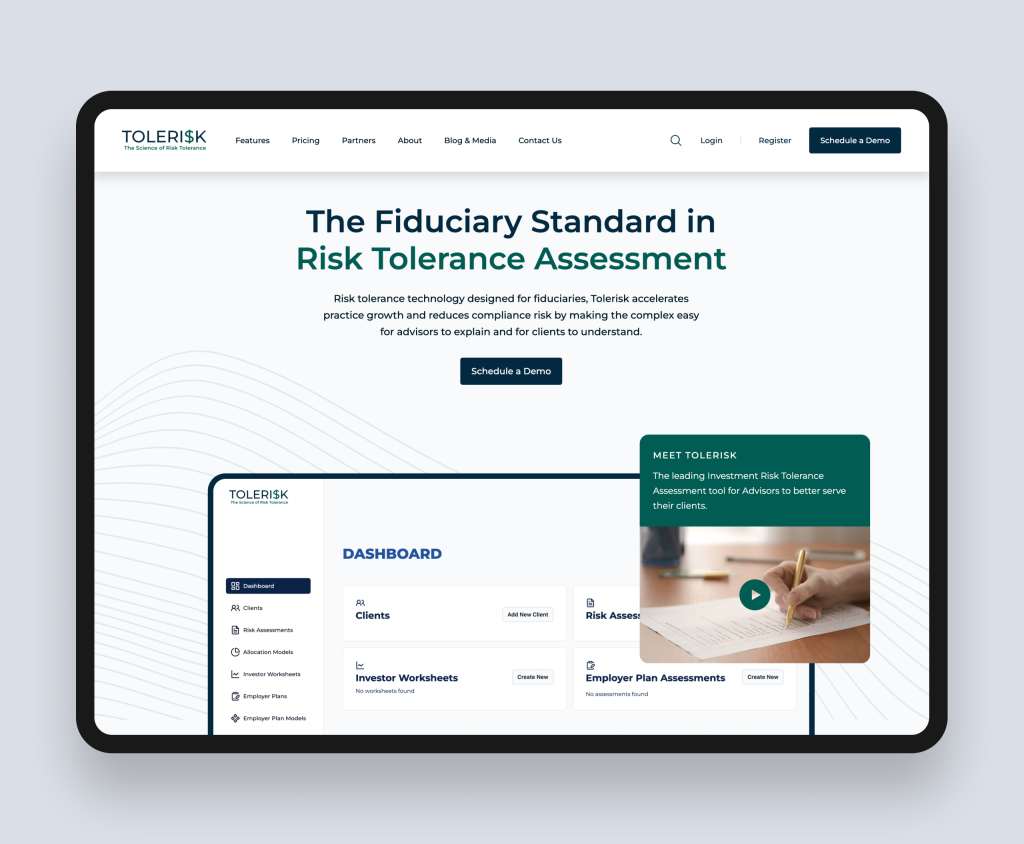
| Case study: Tolerisk (Financial SaaS, custom WordPress theme) |
| Tolerisk is a math-intensive financial SaaS platform serving financial advisors with investment risk modelling tools. Their existing WordPress marketing site needed a complete redesign to coincide with an imminent application release, on a six-week timeline. Rudo rebuilt the site on a custom-developed WordPress theme, delivering speed, security, and a tailored content structure optimised for financial advisors as the primary audience. The tight deadline was met without compromising on design quality or technical performance. The new site launched in tandem with the application release, providing a robust digital foundation for communicating Tolerisk's value proposition to the financial advisory community. Full case study: rudo.co.uk/case-studies/tolerisk/ |
5. WordPress and CRM integration
One of the most commercially significant decisions in a WordPress build is how the site connects to the company's CRM and marketing toolstack. Unlike HubSpot CMS, where this connection is native, WordPress achieves it through a combination of plugin integrations, API connections, and tracking scripts. Done well, the result is a commercially connected website. Done poorly, it produces data gaps and manual reconciliation.
HubSpot integration on WordPress
The HubSpot WordPress plugin connects form submissions to HubSpot CRM, enables contact tracking through the HubSpot cookie, and allows basic marketing automation triggers from form completions. For B2B companies using HubSpot CRM but not requiring the full HubSpot CMS platform, this integration covers the core needs: lead capture, CRM population, and basic engagement tracking.
The limitation is in attribution depth. HubSpot CMS provides native attribution from first website visit to closed deal, with full behavioural tracking of every page visited by a known contact. The WordPress plugin provides a partial version of this: form submissions and some engagement data, but not the complete native intelligence of a HubSpot CMS build.
Salesforce integration on WordPress
Several mature plugins connect WordPress forms to Salesforce CRM, including Gravity Forms with its Salesforce add-on and dedicated Salesforce-WordPress connector plugins. For B2B companies using Salesforce as their primary CRM, this is a meaningful practical advantage over HubSpot CMS, which does not natively support Salesforce in the same way.
Custom CRM and API integrations
For B2B companies with bespoke CRM systems, proprietary databases, or complex data requirements, WordPress's open architecture allows custom API integrations to be built and maintained. This is where WordPress's flexibility advantage over managed platforms is most commercially significant: there is no platform limitation on what can be connected.
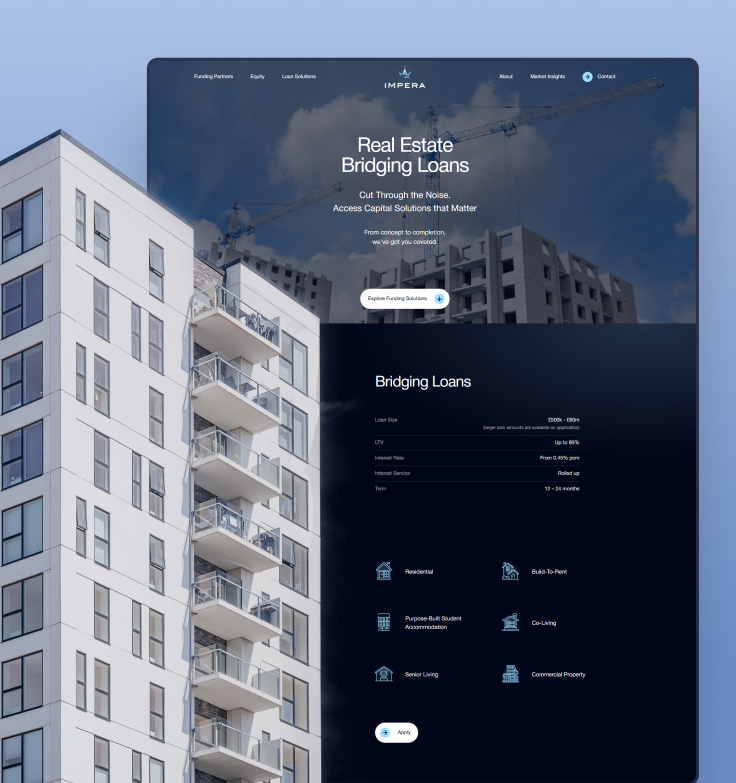
| Case study: Impera Finance (Real estate capital advisory, custom WordPress theme) |
| Impera Finance is a London-based real estate finance advisory that has arranged and executed more than £500 million in funding across debt and equity. Their previous website did not communicate their reputation or provide the technical foundations needed to support digital marketing. Rudo built a custom WordPress theme with a clear information architecture and a design system that communicates credibility to sophisticated property developers and investors. Campaign-focused landing pages were built for LinkedIn marketing, and HubSpot forms and CRM workflows were integrated natively for lead capture, tracking, and reporting. Within three months of launch, Impera saw a 35% increase in visitor engagement, a 25% boost in page views per session, and 20% growth in organic traffic. Full case study: rudo.co.uk/case-studies/impera-finance/ |
6. WordPress vs Webflow vs HubSpot CMS
The platform decision is the most consequential choice in a B2B website project. Here is the honest comparison.
| Factor | WordPress | Webflow | HubSpot CMS |
| Flexibility and custom development | Unlimited — open source, full code access | High within the visual framework | Moderate — constrained by HubSpot architecture |
| Content scale | Unlimited — no practical limits | Up to 10,000 CMS items (Business plan) | No hard limits on most plans |
| CRM integration | Via plugins and APIs (all major CRMs) | Via integrations (HubSpot, Salesforce, etc.) | Native HubSpot CRM only |
| Marketing team autonomy | Moderate — editing well; layout changes need dev | High — visual editor, fast page building | High — within HubSpot's toolchain |
| Platform maintenance | Ongoing (security, plugins, hosting) | Zero — fully managed | Zero — fully managed |
| SEO tooling | Best in class — Yoast, Rank Math, full control | Good — solid foundations, external tools needed | Good — built-in recommendations |
| Design fidelity | Excellent with custom theme development | Excellent — highest no-code fidelity | Good — module system limits some treatments |
| Platform cost | Hosting: £50 to £300/month + plugin licences | From £39/month (Business) | From ~£400/month (Professional) |
| Best for | Complex builds, large content, custom integrations | Design-led, SaaS, fast-moving marketing teams | HubSpot CRM users, data-driven sales cycles |
The honest summary
WordPress wins on flexibility, content scale, and integration breadth. No platform comes close to what WordPress can accommodate in terms of custom development, complex content models, and integration with the full range of enterprise tools. The trade-off is that it requires more technical expertise to implement well and ongoing attention to maintain.
Webflow wins on design quality, marketing team velocity, and operational simplicity. For design-led B2B companies that do not have complex custom requirements and want their marketing team to move fast without developer dependency, Webflow is typically the strongest choice.
HubSpot CMS wins on native data connectivity and commercial intelligence. For companies already operating within the HubSpot ecosystem, the native connection between the website, CRM, marketing automation, and sales pipeline is a meaningful advantage that justifies the higher platform cost.
Find out more about our WordPress web design service, our Webflow agency service, and our HubSpot CMS agency service.
7. What a WordPress project involves
A WordPress project at Rudo follows the same strategic foundation as any well-run B2B website project, with specific phases that reflect the platform's custom development approach.
Discovery and strategy: weeks 1 to 2
Stakeholder interviews, audience persona development, competitor analysis, positioning review, and commercial goal setting. For WordPress projects, discovery also includes a technical architecture review: what custom post types are needed, how the content model should be structured, which plugins will be used and audited, what integrations are required, and what hosting infrastructure the site will run on.
Copywriting: three tiers, planned upfront
Copywriting is scoped before the project begins. Three tiers are available:
- Strategic guidance: Rudo provides detailed page-by-page copy outlines; your team writes the final copy. Adds approximately £1,500 to £3,000.
- Hybrid: Rudo writes the high-impact pages (homepage, key landing pages, core service or product pages); your team handles the rest. Adds approximately £3,500 to £7,000. Most commonly chosen.
- Full copywriting: Rudo writes everything, beginning with a messaging workshop. Adds approximately £6,000 to £14,000 and 1 to 2 weeks to the timeline.
UX and wireframing: weeks 3 to 4
Information architecture, user flow mapping, and wireframes for all page templates. For WordPress projects, this phase also defines the custom post type architecture and content field structure: the decisions that determine how content is managed in the WordPress admin after launch.
Visual design: weeks 5 to 7
High-fidelity design in Figma across all templates, desktop and mobile. Custom WordPress theme development begins from this Figma design, with no visual compromise between what is designed and what is built.
WordPress development: weeks 8 to 13
Custom theme development in PHP, CSS, and JavaScript. ACF PRO field group setup for all custom content types. Plugin selection, configuration, and integration. CRM and third-party tool connections. Performance optimisation: image compression, caching configuration, Core Web Vitals tuning. Security hardening: login protection, file permissions, security plugin configuration. Staging environment testing before launch.
Launch and handover: weeks 14 to 15
Pre-launch SEO configuration: 301 redirects if migrating, meta titles and descriptions, XML sitemap, canonical tags, structured data. Cross-browser and device QA. Hosting migration and DNS cutover. Post-launch monitoring during the first 30 days. WordPress admin training for the marketing team, covering content editing, custom field usage, plugin management basics, and the day-to-day content operations the team will handle independently.
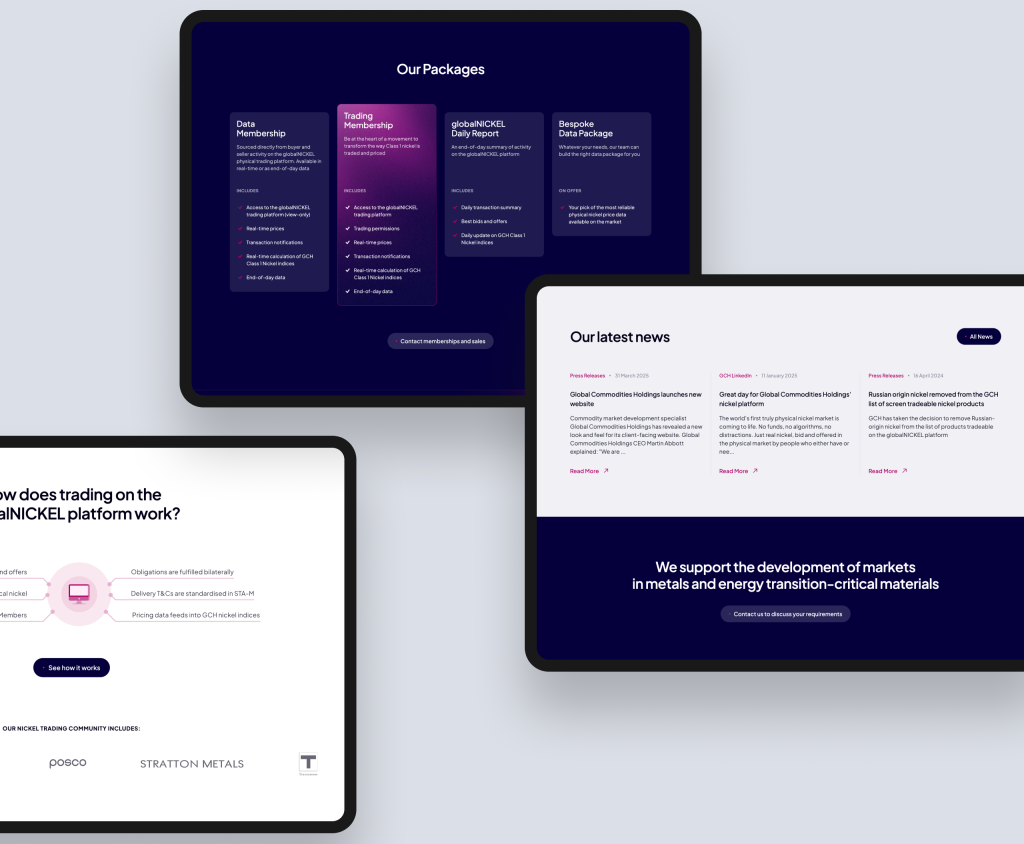
| Case study: Global Commodities Holdings (Commodities trading / digital marketplace, custom WordPress theme) |
| Global Commodities Holdings operates a digital marketplace connecting buyers and sellers of physical commodities, starting with coal through their established globalCOAL platform and now expanding into metals including nickel, lithium, and cobalt. They needed a new website, distinct from the legacy coal platform, with a modern UI and a flexible structure that could accommodate new commodity verticals as the business grows. Rudo built the site on a custom WordPress theme with a modular layout system designed for consistent rollout across new commodity categories. The flexibility of WordPress's custom theme architecture was the defining factor in the platform choice: the site needed to evolve with the business's expansion into new markets without requiring structural rebuilds each time a new commodity vertical launched. Full case study: rudo.co.uk/case-studies/global-commodities-holdings/ |
For guidance on migrating an existing site to WordPress, read our guide to migrating to WordPress.
8. How much does a WordPress website cost?
WordPress website costs have two components: the hosting and infrastructure costs (ongoing) and the build cost (one-off). Unlike HubSpot CMS, there is no platform subscription. Unlike Webflow, there are ongoing maintenance costs to factor into the total.
Hosting and infrastructure
- Managed WordPress hosting: 50 to 200 per month. Providers such as Kinsta, WP Engine, and Cloudways offer managed environments with automatic backups, staging environments, CDN, and performance optimisation included. For most mid-market B2B sites, this is the appropriate approach.
- Enterprise hosting: 200 to 500+ per month. For high-traffic sites, sites with specific compliance requirements, or organisations needing SLA guarantees and dedicated support.
- Plugin licences: 100 to 500 per year. ACF PRO, premium SEO plugins, form builder plugins, security plugins, and any specialist extensions required by the project.
Build costs
- Standard build: £12,000 to £25,000. A fully custom-designed WordPress site with a thorough discovery and strategy phase, 15 to 30 page templates, custom theme development with ACF PRO, essential plugin integration, CRM connection, pre-launch SEO setup, and team training. Appropriate for most mid-market B2B companies.
- Complex build: £25,000 to £50,000. Larger sites with custom post type architecture, complex integration requirements, membership or gated content functionality, advanced custom fields, headless WordPress configuration, or multi-language setup.
- Enterprise build: £50,000 and above. Multi-site deployments, bespoke custom functionality equivalent to a web application, complex third-party system integrations, and large-scale content migrations.
Ongoing maintenance
WordPress requires ongoing maintenance that managed platforms do not: WordPress core updates, plugin updates, security monitoring, hosting oversight, and periodic performance audits. This can be handled through a managed hosting provider, a maintenance retainer with an agency (typically £500 to £1,500 per month for active B2B sites), or in-house if you have the development capability.
Factoring in maintenance costs is important when comparing WordPress to Webflow or HubSpot CMS on total cost of ownership. The platform cost advantage of WordPress narrows when maintenance is properly accounted for. For companies without in-house development resource, the total cost of keeping a WordPress site running well over two to three years often approaches the cost of a managed platform.
For a detailed breakdown of WordPress website costs, read our WordPress website cost guide.
9. How to choose a WordPress agency
WordPress is one of the most widely used platforms on the planet, which means the quality range among agencies claiming WordPress expertise is enormous. The difference between a WordPress agency that builds on custom themes with clean code and one that builds on page builders with accumulated plugins is the difference between a long-term commercial asset and a site that needs rebuilding in two years.
Questions that reveal genuine WordPress expertise
- Do you build on custom themes or page builders? This is the most important question. An agency that builds on Elementor, Divi, or WPBakery is not delivering the same product as one that builds custom themes in PHP. Ask specifically how they develop WordPress sites and why.
- How do you use Advanced Custom Fields? ACF PRO is the standard tool for custom content fields in professional WordPress development. An agency that does not use it, or does not know what it is, is not building at a professional level. Ask them to describe how they would structure the content model for your site.
- What is your approach to WordPress security? A serious WordPress agency should be able to describe their security approach in detail: plugin audit process, login protection, file permission configuration, security monitoring, and their incident response process if a site is compromised.
- How do you handle performance optimisation? Core Web Vitals matter for SEO and conversion. Ask specifically about their approach to image optimisation, caching, code minification, and hosting configuration for performance.
- Can they show custom theme work? Ask to see the last three WordPress sites they have delivered and verify they are genuinely custom-built rather than modified themes. Review the page source or ask directly about the theme approach.
For a full checklist of questions to ask any B2B web design agency, read how to choose a B2B web design agency.
Find out more about our WordPress web design and development service.
WordPress for your industry
Rudo builds custom WordPress websites across all major B2B sectors. WordPress's flexibility makes it particularly well suited to industries with complex content requirements, strict compliance needs, or bespoke integration demands.
Find out more about our work in financial services web design, SaaS and tech web design, recruitment web design, property web design, healthcare web design, and manufacturing web design.
Ready to build a B2B website on WordPress that actually performs?
Rudo is a London-based B2B web design agency and WordPress specialist. We design and build custom WordPress websites on bespoke themes, not page builders, for B2B companies that need flexibility, performance, and a site built to last.
Ranked number one in the UK on DesignRush and top ten on Clutch. Every project starts with strategy before design, and every WordPress build is delivered on a custom theme with clean, maintainable code and full team training.
Book a no-obligation intro call.
We will review your current site, understand your requirements, and give you an honest view of whether WordPress is the right platform for your situation and what a custom theme build would involve.
Browse WordPress website examples from our portfolio.
10. Frequently asked questions
What is a WordPress agency?
A WordPress agency is a web design and development agency that specialises in building websites on WordPress. Genuine WordPress agencies build on custom themes, not page builders, with clean PHP development, structured content fields, and proper security and performance practices. Rudo is a London-based B2B WordPress agency.
Is WordPress good for B2B websites?
WordPress is excellent for B2B websites, particularly for companies with complex custom development requirements, large content operations, or integration needs that managed platforms cannot accommodate. It is the most flexible platform available and the most capable for technically demanding builds. The trade-off is that it requires more expertise to implement well and ongoing attention to maintain properly.
How much does a custom WordPress website cost in the UK?
A custom WordPress website has ongoing hosting costs (typically £50 to £200 per month for managed WordPress hosting) and a one-off build cost. Build costs for a mid-market B2B site typically range from £12,000 to £25,000, with complex builds reaching £50,000 and above. Copywriting adds £1,500 to £14,000 depending on the tier chosen.
For a full breakdown, read our WordPress website cost guide.
What is the difference between a custom WordPress theme and a page builder?
A custom WordPress theme is built from the ground up to the client's specific design and functional requirements using PHP, CSS, and JavaScript. A page builder such as Elementor or Divi is a plugin that adds a drag-and-drop interface for building pages within a pre-existing framework. Custom themes produce faster, more secure, more maintainable sites with no visual compromise. Page builders are faster and cheaper to deploy but produce bloated code, introduce security vulnerabilities, and create sites that are harder to maintain over time.
Can WordPress integrate with HubSpot CRM?
Yes. The HubSpot WordPress plugin connects form submissions to HubSpot CRM, enables contact tracking, and allows basic marketing automation triggers. This covers the core needs of most B2B companies using HubSpot CRM without requiring the HubSpot CMS platform. The depth of attribution and behavioural tracking available natively in HubSpot CMS is not fully replicated through the plugin, but for most use cases the integration is sufficient.
How does WordPress compare to Webflow for B2B?
WordPress wins on custom development flexibility, content scale, and integration breadth. Webflow wins on design team velocity, marketing team independence, and zero-maintenance infrastructure. The right choice depends on your requirements: if you need something that managed platforms cannot build, WordPress is the answer. If your priority is design quality and marketing team speed, Webflow is typically the stronger choice.
Read our detailed comparison: WordPress vs Webflow for B2B.
How does WordPress compare to HubSpot CMS for B2B?
WordPress wins on flexibility, integration breadth, and content scale. HubSpot CMS wins on native CRM data connectivity and commercial attribution. If you are already using HubSpot CRM and Marketing Hub, HubSpot CMS is almost always the better choice. If you are not in the HubSpot ecosystem, WordPress offers more capability at lower platform cost for complex requirements.
Read our detailed comparison: WordPress vs HubSpot CMS for B2B.
What is headless WordPress?
Headless WordPress uses WordPress as a content management back-end while serving the front-end through a separate framework such as Next.js. This delivers exceptional page speed and flexibility for the front-end while retaining all of WordPress's content management capability. Rudo builds headless WordPress sites for B2B companies with performance-critical requirements or complex multi-channel content delivery needs.
How long does a WordPress website project take?
A mid-market custom WordPress project typically takes 12 to 15 weeks from kickoff to launch. Discovery and strategy: 1 to 2 weeks. UX and wireframing: 1 to 2 weeks. Visual design: 2 to 3 weeks. WordPress development: 5 to 6 weeks. Launch and handover: 1 to 2 weeks. Complex builds with extensive custom functionality, integrations, or content migration take proportionally longer.
View our WordPress portfolio and find out more about our WordPress web design service.

Written by
Rudo Agency
Rudo is a strategy-led web design and development agency specialising in B2B. Based in the UK and working with clients globally, we help ambitious brands turn complex ideas into high-performing websites. Our team combines digital strategy, UX/UI design, custom development, and SEO to deliver results-focused websites that support real business growth.
