Overview
Most B2B marketing teams spend too much time waiting. Waiting for a developer to publish a landing page. Waiting for an agency to update copy. Waiting for the next sprint to add a section that should take an afternoon. Every day a campaign page sits in the backlog is a day the campaign does not perform.
Webflow was built to solve this problem. It is a visual development platform that produces genuinely custom, high-quality websites while giving marketing teams the ability to build new pages, update content, and iterate on designs without raising a single development ticket. The sites it produces are fast, the hosting is managed, and the operational overhead is close to zero.
For B2B companies where design is a competitive differentiator and marketing velocity matters, Webflow is the most capable platform available without the developer dependency that slows most organisations down.
This guide covers everything a B2B marketing leader needs to know about building on Webflow: what the platform does, who it is right for, what a project costs, and how to choose the right Webflow agency for your project.
In this guide:
- What is Webflow and why are B2B companies choosing it?
- Who Webflow is built for
- The Webflow feature set: what you actually get
- Marketing team velocity: the core Webflow advantage
- Webflow CMS: managing content at scale
- Webflow vs WordPress vs HubSpot CMS
- What a Webflow project involves
- How much does a Webflow website cost?
- How to choose a Webflow agency
- Frequently asked questions
This guide connects to our complete guide to B2B web design and our comparison of WordPress vs Webflow vs HubSpot for B2B.
1. What is Webflow and why are B2B companies choosing it?
Webflow is a visual development platform that allows developers to build fully custom websites in a code-like visual environment, while giving marketing teams the ability to manage, update, and expand those sites independently after launch. It combines the design flexibility of custom development with the operational simplicity of a managed platform.
It is not a website builder in the Squarespace or Wix sense. Webflow produces production-quality code, handles hosting and CDN natively, and gives developers the control they need to build genuinely bespoke experiences. The difference from traditional development is in the workflow: what would take a developer weeks of custom coding can be built in Webflow's visual environment in a fraction of the time, with output that is cleaner and more maintainable than many hand-coded sites.
Why B2B companies are choosing Webflow
The shift toward Webflow among B2B companies reflects a change in what marketing teams need from their website. Ten years ago, a website that looked good and loaded reasonably quickly was sufficient. Today, B2B marketing teams are expected to launch campaign pages for each product update, test new messaging on key pages, build out content clusters for SEO, and iterate on conversion performance continuously. A website that requires developer involvement for each of these actions is a bottleneck.
Webflow removes that bottleneck. The marketing team can build a new landing page from an existing template in an afternoon. They can update the homepage hero for a campaign and revert it after. They can add a new case study without touching any code. The developer remains involved for new template types and complex functionality, but routine content and page operations become genuinely independent.
Webflow's position in the market
Webflow has grown from a designer-focused tool into one of the three dominant platforms for professional B2B websites alongside WordPress and HubSpot CMS. Its fastest growth is among SaaS companies, professional services firms, and design-conscious B2B brands where the combination of design quality and marketing autonomy aligns with the needs of fast-moving go-to-market teams.
For a detailed comparison of where Webflow sits relative to the other major platforms, read our guide to WordPress vs Webflow vs HubSpot for B2B.
2. Who Webflow is built for
Webflow is not the right choice for every B2B company. Understanding exactly who it serves best prevents an expensive mismatch between platform and need.
The ideal Webflow client
- Design-led B2B brands. Companies where the quality of the website is a meaningful part of how they position themselves in their market. SaaS companies, professional services firms, tech companies, and creative agencies where a visually generic site creates a credibility gap.
- Marketing teams that need to move fast. Webflow's defining advantage is marketing team velocity. If your team is currently blocked from launching campaign pages, testing new messaging, or expanding content without developer support, Webflow is built to solve that specific problem.
- Companies without in-house development resource. Webflow's managed hosting, automatic security, and zero maintenance overhead make it a strong choice for companies that want a high-quality website without the operational burden of maintaining a WordPress environment.
- B2B companies not deeply embedded in HubSpot. Webflow integrates with HubSpot CRM for lead tracking and form management, but if you are not using HubSpot as your primary CRM and marketing platform, Webflow gives you design quality and marketing autonomy at a significantly lower platform cost than HubSpot CMS.
- SaaS companies at seed to Series B. Webflow is the default platform choice for most well-funded early-stage SaaS companies. The combination of design quality, marketing velocity, and low maintenance overhead aligns precisely with the priorities of a go-to-market team at growth stage.
- Companies undergoing a rebrand or repositioning. Webflow's design fidelity makes it the strongest platform for translating a new brand identity into a digital presence with precision. What a designer creates in Figma can be built in Webflow without the visual compromises that arise from working within a theme or module system.
When Webflow is probably not the right choice
- You are deeply integrated with HubSpot CRM, Marketing Hub, and Sales Hub, and native data connectivity, smart content personalisation, and unified attribution reporting are priorities. HubSpot CMS is the better fit.
- Your website requires very complex custom development: bespoke integrations with legacy enterprise systems, complex custom application logic, or a very large structured content database. WordPress with custom development is typically more flexible for these requirements.
- Your primary metric is the lowest possible platform cost and you have in-house development capability to manage a WordPress environment. WordPress hosting is cheaper than Webflow at equivalent traffic levels.
For a direct platform comparison, read our guide to Webflow vs WordPress and our guide to Webflow vs HubSpot CMS.
3. The Webflow feature set: what you actually get
This section covers what Webflow actually provides, explained in terms of what matters for a B2B company, not a technical feature inventory.
Visual development environment
Webflow's Designer is a browser-based visual development tool that works with CSS and HTML concepts directly, without requiring the developer to write raw code. Developers work visually but with the precision and control of code: setting exact breakpoints, configuring animations, controlling typography with typographic precision, and managing complex layout structures.
The output is clean, semantic HTML and CSS that is not locked into Webflow's proprietary format. Webflow allows code export for companies that want to host elsewhere, though the majority of clients use Webflow's own hosting infrastructure.
Managed hosting and CDN
Every Webflow site is hosted on Webflow's global CDN infrastructure. SSL is included on all paid plans, there are no security patches to apply, no hosting configuration to manage, and no plugin ecosystem to maintain. The operational overhead of running a Webflow site is essentially zero compared to a self-hosted WordPress environment.
Webflow's Business plan (from £39 per month billed annually) is the appropriate tier for most B2B marketing sites. It supports up to 10,000 CMS items and 100GB bandwidth, with enterprise-level plans available for organisations requiring SLAs and advanced security compliance.
The Editor: content management for non-developers
Alongside the Designer (used by developers), Webflow provides a separate editing interface for non-technical users. The Editor allows content managers to update text, images, and CMS content directly on the live page without touching the Designer or any code. Well-built Webflow sites give marketing teams the ability to update any content element and publish changes in minutes.
Note: Webflow announced that the legacy Editor will be retired in August 2026, moving all content editing to their updated CMS experience. For new builds, this is the environment to plan around.
Webflow CMS
Webflow's CMS allows structured content to be managed through Collections: defined content types (blog posts, case studies, team members, products) with custom fields that populate page templates dynamically. A well-structured Webflow CMS means a marketing team can add a new case study by filling in a form, and it appears across every page that references case studies automatically.
The CMS has item limits by plan: up to 2,000 items on the CMS plan, up to 10,000 on the Business plan. For most B2B marketing sites, these limits are more than sufficient.
For a detailed breakdown of Webflow's CMS for B2B, read our Webflow CMS guide.
Animations and interactions
Webflow's animation and interaction capabilities are the most powerful of any no-code platform, and represent one of its strongest differentiators for design-led B2B brands. Scroll-triggered animations, page transitions, hover states, and complex interaction sequences can all be built in Webflow's visual environment without custom JavaScript.
For SaaS companies building product demonstration pages, for professional services firms building visually distinctive brand experiences, and for any B2B company where the website's design quality is a meaningful part of how they compete, this capability matters.
SEO tools
Webflow includes solid on-page SEO controls: editable meta titles and descriptions, canonical tag management, automatic XML sitemap generation, 301 redirect management, and structured data support. The platform does not include the guided, in-editor SEO recommendations that HubSpot CMS provides, so Webflow teams typically pair the platform with an external SEO tool for keyword tracking and content optimisation guidance.
From a technical SEO perspective, Webflow produces clean, semantic HTML and fast-loading pages by default, which gives it a strong foundation compared to poorly optimised WordPress sites.
4. Marketing team velocity: the core Webflow advantage
The single most commercially impactful feature of Webflow for B2B companies is not its design capability, its hosting infrastructure, or its CMS. It is the speed at which a marketing team can operate after launch.
What velocity means in practice
On a well-built Webflow site with a properly structured template library, a marketing team can:
- Build a new campaign landing page from an existing template in two to four hours, without developer involvement
- Update homepage copy for a campaign and revert it after, same day
- Add a new case study, team member, or blog post in under 30 minutes
- Create a new industry-specific landing page by duplicating and customising an existing template
- A/B test a headline or CTA by building a variant page and splitting traffic
On a WordPress site without a carefully built editing environment, most of these actions require either developer support or significant technical skill. On HubSpot CMS, most of these are possible but require learning HubSpot's specific toolchain. On Webflow, the editor experience is genuinely intuitive for marketing professionals with moderate digital literacy.
The template library: the key to sustained velocity
Marketing team velocity on Webflow is not automatic. It depends entirely on the quality of the template library built during the initial project. A well-structured Webflow build includes a set of reusable page templates (homepage, landing page, use-case page, case study, blog post) and a component library (hero sections, feature blocks, testimonial layouts, CTAs, pricing tables) that marketing teams can combine to build new pages quickly.
A Webflow site built without this structure forces marketing teams back to the designer for every new page. The template and component library is what makes the velocity advantage real and sustainable.
| Rudo's approach |
| Every Webflow build Rudo delivers includes a structured template and component library designed specifically for the client's marketing team. We spend the last phase of every project running the marketing team through what they can build independently and how, so the velocity benefit starts on launch day rather than six months later. |
5. Webflow CMS: managing content at scale
Webflow's CMS is structured around Collections: groups of content items that share a common structure. A blog is a Collection. A case study library is a Collection. A team directory is a Collection. Each Collection has fields defined during the build (title, body, author, date, category, featured image, and so on), and those fields populate templates dynamically.
How B2B companies use Webflow CMS
- Blog and insights. The most common CMS use. Writers add posts through the Editor, images and fields are standardised by the Collection structure, and posts appear automatically on the blog index and any related content widgets across the site.
- Case studies. A case study Collection with fields for client name, industry, services used, outcome statistics, and body content allows new case studies to be added quickly while appearing correctly across every page that surfaces them: homepage, industry pages, service pages, and the main case study index.
- Team directory. Useful for professional services firms and agencies where team profiles need to be maintained and updated regularly without developer involvement.
- Product or service pages. For SaaS companies with multiple products or features, a Collection-based approach allows new product or feature pages to be added at scale without building each one from scratch.
- Job listings. A careers Collection connected to a recruitment workflow, allowing open positions to be added and removed without touching page templates.
CMS limitations to be aware of
Webflow's CMS has item limits: 2,000 items on the CMS plan, 10,000 on the Business plan. For most B2B marketing sites these limits are comfortably sufficient, but companies planning very large content operations should verify their CMS item requirements before choosing Webflow over WordPress.
Complex relational content structures (content items that reference other content items across multiple levels) can hit architectural limits in Webflow's CMS that WordPress handles more gracefully. If your content model is genuinely complex, discuss this with your Webflow agency before committing to the platform.
For a full guide to Webflow's CMS for B2B, read our Webflow CMS guide.
6. Webflow vs WordPress vs HubSpot CMS
The three-platform comparison is the question we field most often. Here is how we actually think about it.
| Factor | Webflow | WordPress | HubSpot CMS |
| Design quality and fidelity | Excellent — highest fidelity of any platform | High with custom dev, variable with themes | Good — module system limits some design freedom |
| Marketing team autonomy | High — visual editor, fast page building | Moderate — layout changes often need dev | High — but within HubSpot's specific toolchain |
| CRM integration | Via integrations (HubSpot, Salesforce, etc.) | Via plugins | Native (HubSpot CRM only) |
| Smart content / personalisation | Limited native — via third-party tools | Via plugins | Excellent native capability |
| Platform maintenance | Zero — fully managed | Ongoing — self-managed | Zero — fully managed |
| Monthly platform cost | From £23/month (CMS) to £39/month (Business) | Hosting: £50 to £300 per month + plugins | From ~£400/month (Professional) |
| Animation and interactions | Best in class — no-code animations | Requires custom dev or plugins | Limited native |
| Content at scale | Good up to 10,000 CMS items | Excellent — no practical limit | Good — no hard limits on most plans |
| Best for | Design-led B2B, SaaS, fast-moving marketing teams | Content-heavy, complex custom builds | HubSpot CRM users, complex B2B sales cycles |
The honest summary
Webflow wins on design quality, marketing velocity, and operational simplicity. It is the strongest choice for B2B companies where the website's visual quality matters, where the marketing team needs to move fast, and where the platform cost of HubSpot CMS is not justified by a deep HubSpot ecosystem.
WordPress wins on content scale, custom development flexibility, and raw cost. If you have complex custom requirements, a very large content operation, or in-house development capability to manage the environment, WordPress remains the most capable option.
HubSpot CMS wins on data connectivity and commercial intelligence. If you are already using HubSpot CRM, Marketing Hub, and Sales Hub, HubSpot CMS connects the website to your entire commercial operation natively in a way that no other platform matches.
Find out more about our Webflow agency service, our WordPress web design service, and our HubSpot CMS agency service.
7. What a Webflow project involves
A Webflow project follows the same strategic foundation as any well-run B2B website project, with some specific phases that reflect the platform's strengths.
Discovery and strategy: weeks 1 to 2
Stakeholder interviews, audience persona development, competitor analysis, positioning review, and commercial goal setting. For Webflow projects, discovery also includes a review of the template and component library requirements: what page types the marketing team needs to build independently after launch, and how the component architecture should be structured to support that.
Copywriting: three tiers, planned upfront
As with all Rudo projects, copywriting is scoped before the project begins. Three tiers are available:
- Strategic guidance: Rudo provides detailed page-by-page copy outlines; your team writes the final copy. Adds approximately £1,500 to £3,000.
- Hybrid: Rudo writes the high-impact pages (homepage, key landing pages, core service or product pages); your team handles the rest using our messaging framework. Adds approximately £3,500 to £7,000. Most commonly chosen.
- Full copywriting: Rudo writes everything, beginning with a messaging workshop. Adds approximately £6,000 to £14,000 and 1 to 2 weeks to the timeline.
UX and wireframing: weeks 3 to 4
Information architecture, user flow mapping, and wireframes for all page templates. Webflow-specific: this phase also defines the component library architecture — the set of reusable sections and elements that will give the marketing team independence after launch. Getting this right is the most important decision in a Webflow project for long-term marketing velocity.
Visual design: weeks 5 to 7
High-fidelity design in Figma across all templates, desktop and mobile. Webflow's design fidelity advantage is most visible here: Figma designs can be built in Webflow with pixel-perfect accuracy, without the layout compromises that arise from working within WordPress themes or HubSpot module systems.
Webflow development: weeks 8 to 12
Webflow build of all templates and components. CMS structure setup with Collections defined and fields configured. Integrations connected: HubSpot form tracking, CRM connection, analytics, live chat, and any other third-party tools. Animation and interaction build for any scroll, hover, or page transition effects. Responsive QA across all breakpoints.
Launch and handover: weeks 13 to 14
Pre-launch SEO configuration: 301 redirects if migrating, meta titles and descriptions, sitemap submission, canonical tags. QA across browsers and devices. Launch and post-launch monitoring. CMS training session: walking the marketing team through how to add blog posts, case studies, landing pages, and update existing content. Component library documentation so the team knows exactly what they can build independently.
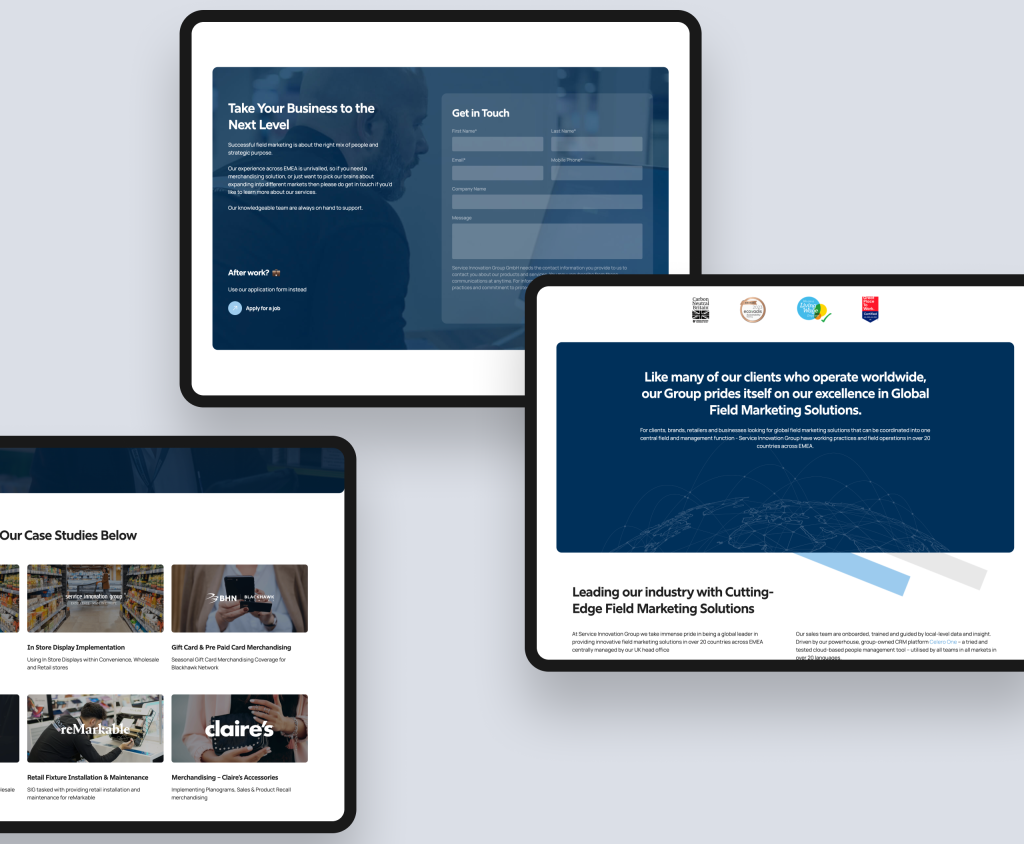
| Case study: Service Innovation Group (Field sales solutions, Webflow) |
| SIG (Service Innovation Group) specialises in providing world-class field sales solutions, empowering brands, retailers, and businesses to conquer new markets. Following a comprehensive rebrand, SIG needed a website that aligned with their refreshed identity and clearly communicated their restructured service offering to distinct user groups across diverse markets. Rudo chose Webflow as the platform for its ability to support rapid development and give the SIG team flexible, easy content management capabilities post-launch. The result was a website that effectively communicated SIG's expertise in field sales, with improved navigation and clear service presentation tailored to different user groups. Full case study: rudo.co.uk/case-studies/service-innovation-group/ |
For guidance on migrating an existing site to Webflow, read our guide to migrating to Webflow.
8. How much does a Webflow website cost?
Webflow website costs have two components: the platform subscription and the build cost. Unlike HubSpot CMS, the platform cost is modest, which means the build cost dominates the total investment.
Platform subscription costs
Webflow's site plans are priced per site and billed annually:
- CMS plan: from £23 per month. Supports up to 2,000 CMS items and 50GB bandwidth. Appropriate for smaller B2B sites with a blog and limited structured content.
- Business plan: from £39 per month. Supports up to 10,000 CMS items and 100GB bandwidth. The appropriate plan for most B2B marketing sites. Modular pricing allows higher CMS item tiers at higher cost.
- Enterprise plan: custom pricing. For organisations requiring SLAs, advanced security compliance, SSO, and dedicated support. Typically starts at £15,000 per year for Enterprise Lite.
Webflow also has Workspace plans for teams collaborating on the build: from £19 per seat per month for limited access (content editing only) to £39 per seat per month for full access (Designer access). These are typically relevant during the build phase and for ongoing agency retainer work, not for the marketing team's day-to-day editing.
Build costs
- Early stage: £8,000 to £18,000. A focused site of 10 to 20 pages with a core template library, CMS structure, integrations, and handover training. Appropriate for seed-stage companies or those with straightforward requirements.
- Growth stage: £18,000 to £35,000. Fully custom design with a thorough discovery and strategy phase, comprehensive template and component library, complex animations and interactions, CMS Collections for blog, case studies and team, third-party integrations, and full handover. This is where Rudo works most frequently with B2B clients.
- Scale stage: £35,000 to £60,000+. Larger sites with multiple audience segments, extensive component libraries, complex integration requirements, multi-language setup, and ongoing retainer support.
Copywriting
As with all Rudo projects, copywriting is scoped separately. Strategic guidance adds £1,500 to £3,000; hybrid adds £3,500 to £7,000; full copywriting adds £6,000 to £14,000. See section 7 for full details.
Ongoing costs
Beyond the platform subscription (typically £39 to £50 per month for a mid-market B2B site), ongoing costs include: a monthly retainer for landing page builds, SEO content, and iterative improvements (typically £800 to £2,500 per month); and third-party tool subscriptions for CRM, marketing automation, live chat, and analytics.
Webflow's managed hosting means no additional hosting cost, no security management overhead, and no plugin licence costs. The total ongoing cost of ownership is typically lower than an equivalent WordPress environment when you factor in the developer time WordPress requires for maintenance.
For a full breakdown of Webflow website costs, read our Webflow website cost guide.
9. How to choose a Webflow agency
Webflow is a specialist platform. The skills required to build on it well, Webflow's visual development environment, CMS architecture, animation system, and integration ecosystem, are different from those required for WordPress or HubSpot. Choosing an agency without genuine Webflow expertise means paying for a learning curve on your project.
Questions that reveal genuine Webflow expertise
- How do you structure the component library? A genuinely experienced Webflow agency should be able to describe their approach to component architecture in detail: how they define symbols and components, how they structure the class system to avoid conflicts as the site grows, and how they document the library for the marketing team. Vague answers here indicate surface-level Webflow experience.
- Can you show us Webflow sites you have built? Review their portfolio specifically for Webflow work. Check the sites they show: are they genuinely custom and well-designed, or do they look like modified templates? Request references from the specific Webflow projects they show.
- How do you approach the Editor handover? The Editor training and handover is where marketing team velocity begins. Ask specifically what the training covers, whether there is documentation for the component library, and what support they offer in the first 30 days after launch.
- How do you handle SEO during a Webflow build? Ask about their approach to redirect mapping if migrating, canonical tag configuration, meta data management, and sitemap setup. Agencies that treat SEO as an afterthought produce sites that look good but do not rank.
- Are they a Webflow Partner? Webflow's Partner programme recognises agencies that have demonstrated expertise on the platform. It is a meaningful quality signal, though not a guarantee of output quality.
For a complete checklist of questions to ask any B2B web design agency, read how to choose a B2B web design agency.
Webflow for your industry
Rudo builds Webflow websites across all major B2B sectors. The platform's design quality and marketing velocity advantage applies across industries, with the specifics of buyer psychology and trust signals varying by sector.
Find out more about our work in SaaS and tech web design, financial services web design, recruitment web design, property web design, healthcare web design, and manufacturing web design.
Ready to build a B2B website on Webflow that your marketing team can actually use?
Rudo is a London-based B2B web design agency and Webflow specialist. We design, build, and structure Webflow sites that give marketing teams genuine independence: a component library they can work with, a CMS structure that scales, and a website that performs from day one.
Ranked number one in the UK on DesignRush and top ten on Clutch. Every project starts with strategy before design, and every Webflow build is delivered with full editor training and component documentation.
Book a no-obligation intro call.
We will review your current site, understand your go-to-market goals, and give you an honest view of whether Webflow is the right platform for your situation and what a project would involve.
10. Frequently asked questions
What is a Webflow agency?
A Webflow agency is a web design and development agency that specialises in building websites on Webflow's visual development platform. Genuine Webflow agencies have expertise in Webflow's Designer, CMS architecture, interaction system, and hosting infrastructure, and can build sites that give marketing teams the ability to operate independently after launch. Rudo is a London-based B2B Webflow agency.
Is Webflow good for B2B websites?
Webflow is an excellent choice for B2B websites, particularly for design-led companies, SaaS businesses, and marketing teams that need to move fast without developer dependency. It produces high-quality, fast-loading websites with managed hosting and zero maintenance overhead. It is most powerful when combined with a well-structured template and component library that gives marketing teams genuine independence.
How much does a Webflow website cost in the UK?
A Webflow website has two cost components. The platform subscription is modest: from $23 per month for the CMS plan to $39 per month for the Business plan, billed annually. Build costs for a B2B marketing site typically range from 8,000 for an early-stage focused site to 35,000 and above for a comprehensive growth-stage build with full component library, animations, and CMS structure.
For a full breakdown, read our Webflow website cost guide.
How does Webflow compare to WordPress?
Webflow wins on design quality, marketing team velocity, and operational simplicity. WordPress wins on custom development flexibility, content scale, and raw platform cost. For B2B companies where design quality and marketing team independence are priorities and where the maintenance overhead of WordPress is a constraint, Webflow is typically the stronger choice.
Read our detailed comparison: Webflow vs WordPress for B2B.
How does Webflow compare to HubSpot CMS?
Webflow wins on design quality and platform cost. HubSpot CMS wins on native CRM integration, smart content personalisation, and commercial attribution. For companies not deeply embedded in the HubSpot ecosystem, Webflow offers similar marketing autonomy at a significantly lower platform cost. For companies using HubSpot CRM and Marketing Hub, HubSpot CMS's native data connectivity is difficult to replicate through integrations.
Read our detailed comparison: Webflow vs HubSpot CMS.
Can I use Webflow with HubSpot CRM?
Yes. Webflow integrates natively with HubSpot for form tracking, lead capture, and CRM data sync. The HubSpot tracking code on a Webflow site enables contact identification, form submission to CRM, and basic marketing automation triggers. What you cannot replicate natively is HubSpot CMS's smart content personalisation and full attribution reporting, which require the website to be hosted on HubSpot's platform.
How long does a Webflow website project take?
A mid-market Webflow project typically takes 10 to 14 weeks from kickoff to launch. Discovery and strategy: 1 to 2 weeks. UX and wireframing: 1 to 2 weeks. Visual design: 2 to 3 weeks. Webflow development: 4 to 5 weeks. Launch and handover: 1 to 2 weeks. Webflow projects tend to move slightly faster than equivalent HubSpot CMS projects because there is no portal configuration phase.
Is Webflow good for SaaS websites?
Webflow is one of the best platforms for SaaS websites. The combination of design quality, marketing team velocity, and low maintenance overhead aligns precisely with the priorities of a SaaS go-to-market team. Most well-funded SaaS companies at seed to Series B stage choose Webflow as their default platform.
Read our dedicated guide: Webflow for SaaS websites.

Written by
Rudo Agency
Rudo is a strategy-led web design and development agency specialising in B2B. Based in the UK and working with clients globally, we help ambitious brands turn complex ideas into high-performing websites. Our team combines digital strategy, UX/UI design, custom development, and SEO to deliver results-focused websites that support real business growth.
